Social Agency Operations: Roles, Tools, and SOPs
01/31/2026


Most social agencies don’t fail because they lack creative ideas. They fail because delivery becomes unpredictable: approvals stall, access requests drag on, reporting turns into a last-minute scramble, and the team spends Friday fixing problems that should have been prevented on Monday.
“Operations” is the antidote. It is the set of roles, tools, and SOPs that turn social delivery into a system: repeatable, auditable, and scalable.
What “operations” means in a social agency
Social agency operations is the operating system behind outcomes. It answers three questions:
- Who owns what? (Roles, accountability, decision rights)
- How does work move? (SOPs, definitions of done, SLAs)
- How does data move? (Tools, integrations, permissions, governance)
The goal is not bureaucracy. The goal is speed with control: fewer handoff losses, fewer “quick calls,” fewer forgotten approvals, and a reliable path to “first value” after a deal closes.
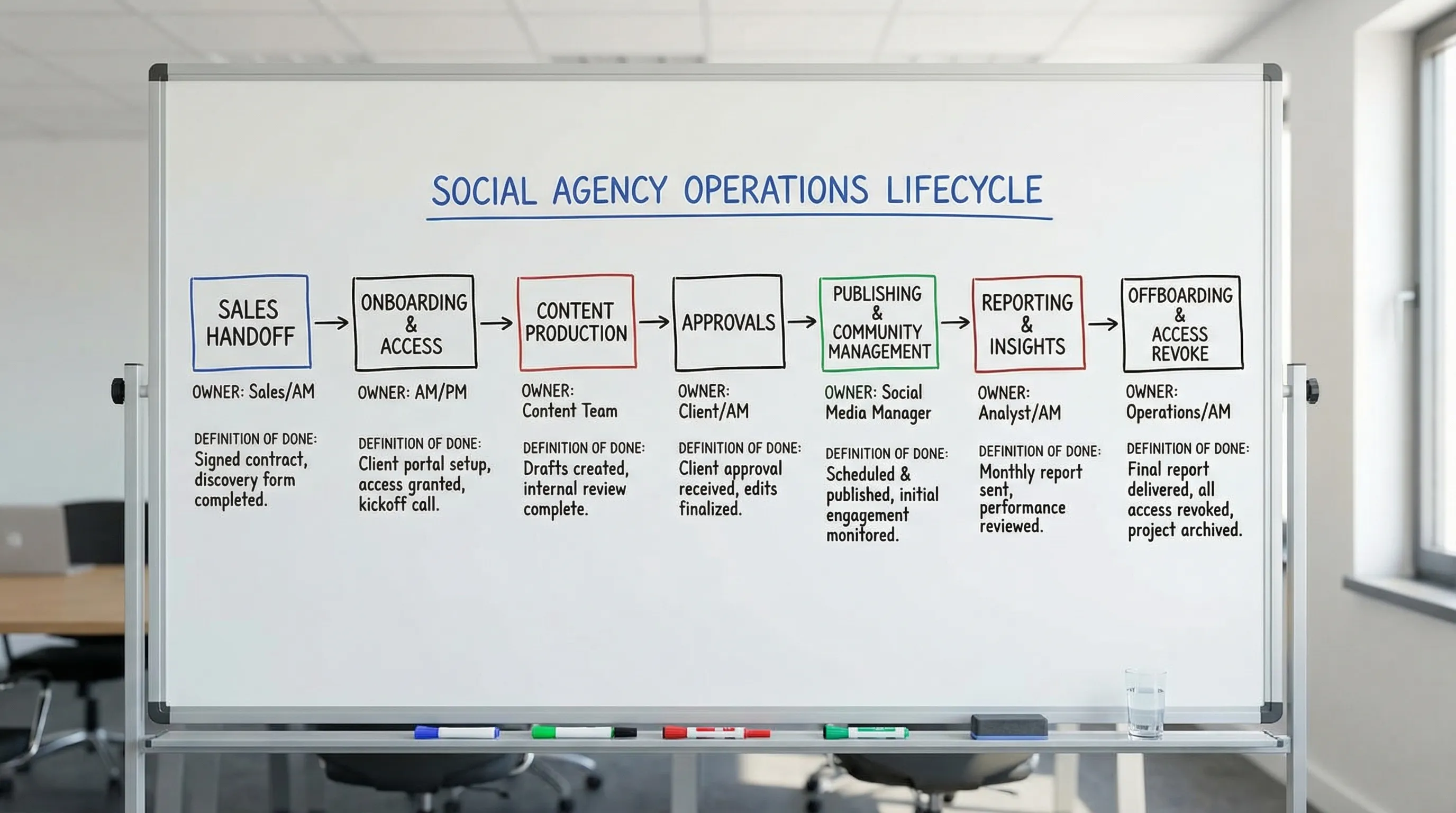
A useful way to frame ops is by lifecycle stage:
- Sales to delivery handoff (what was sold, what success looks like, what constraints exist)
- Onboarding and access (accounts, permissions, assets, tracking, brand inputs)
- Production (briefs, creative, review cycles, versioning)
- Publishing and community (scheduling, QA, moderation)
- Paid social and optimization (testing cadence, guardrails, change control)
- Reporting and learning (weekly insights, monthly decisions, next-bet planning)
- Offboarding and audits (revoke access, archive assets, transfer ownership)
Core roles in a modern social agency (and what they actually own)
Titles vary, but high-performing social agencies separate strategy, production, distribution, and measurement. When one person “kind of” owns each, work slows down and accountability disappears.
Here is a practical role map you can adapt.
| Role | Primary ownership | Key outputs | Operational KPIs (examples) |
|---|---|---|---|
| Account Lead (Client Partner) | Relationship, scope integrity, renewals | Success plan, QBR narrative, escalation decisions | Retention, expansion, on-time approvals, client satisfaction |
| Social Strategist | Channel strategy and content direction | Content pillars, campaign plan, testing roadmap | Strategy-to-output ratio, content performance lift |
| Project Manager (Delivery Ops) | Workflow, resourcing, due dates | Production calendar, traffic control, SOP adherence | On-time rate, cycle time, rework rate |
| Creative Lead | Creative quality and standards | Creative direction, review notes, brand consistency | Approval pass rate, revision count, creative velocity |
| Copywriter | Messaging and conversions | Scripts, captions, hooks, CTAs | First-draft acceptance rate, performance by angle |
| Designer / Editor | Asset production | Static, motion, edits, cutdowns | Production throughput, defect rate (QA issues) |
| Community Manager | Engagement and moderation | Reply playbooks, escalation rules, community reports | Response time SLA, sentiment trends |
| Paid Social Specialist | Paid planning and execution | Campaign builds, experiments, budget pacing | Time-to-launch, CPA/ROAS targets, learning cadence |
| Analyst (or Performance Lead) | Measurement and insight | Weekly scorecard, attribution notes, next actions | Report reliability, insight adoption rate |
| Marketing Ops / Integrations (optional but powerful) | Tooling and automation | System connections, data QA, automation upkeep | Automation coverage, integration uptime |
Two role clarifiers that reduce chaos fast:
-
One person owns “traffic control.” That is usually a PM, not a creative. If nobody owns traffic control, your best people become human routers.
-
Separate “approve” from “review.” Many agencies let too many people “approve,” which guarantees delays. Keep review broad, keep approval narrow.
The lean tool stack for social agency operations
Your stack should match your workflows. A tool that is not connected to an SOP is usually just subscription creep.
A lean, scalable stack typically looks like this:
| Stack layer | What it’s for | Examples (not exhaustive) | What good looks like |
|---|---|---|---|
| Source of truth (work) | Tasks, owners, due dates, capacity | Asana, ClickUp, Jira, Monday | One place to see what is due and who owns it |
| Communication | Fast decisions, async updates | Slack, Teams | Decisions are summarized and linked to the task |
| Creative production | Create and manage assets | Adobe, Figma, CapCut | Version naming, templates, predictable handoffs |
| Asset storage | Brand kits, raw files, exports | Google Drive, Dropbox | Single folder taxonomy used by everyone |
| Publishing | Scheduling + collaboration | Sprout Social, Hootsuite, Buffer, native schedulers | QA checklist before anything goes live |
| Measurement | Reporting and insight | GA4, platform analytics, Looker Studio | One weekly scorecard, consistent definitions |
| Access and onboarding | Secure, consistent access setup | Connexify (client onboarding), password manager | No password sharing, least privilege, fast verification |
| Automation and integrations | Reduce manual copy-paste | Zapier, Make, n8n, webhooks | Automations are owned, tested, and monitored |
Where onboarding tooling matters more than most agencies think
In a social agency, many “ops issues” are actually onboarding issues in disguise:
- No one can access the ad account, so the launch slips.
- The wrong person approved, so the post gets pulled.
- Assets live in personal drives, so the editor can’t find them.
Connexify is designed specifically for this step: it streamlines client onboarding for agencies and service providers through one branded link that can set up fast, secure access across platforms and reduce onboarding time from days to seconds.
If onboarding is currently handled by scattered emails and last-minute DMs, moving it into a consistent flow is one of the highest ROI operational changes you can make.
For a deeper onboarding workflow, see the related playbook: Social Media Agency Onboarding: A Step-by-Step Playbook.
SOPs that keep delivery predictable (without slowing you down)
An SOP is only useful if it has:
- A trigger (when it starts)
- An owner (who ensures it happens)
- A definition of done (what “complete” means)
- An SLA (how fast it must happen)
A simple SOP library can cover 80 percent of a social agency’s operational risk.
A practical SOP library for social agencies
| SOP | Trigger | Owner | Definition of done | Typical SLA |
|---|---|---|---|---|
| Sales-to-delivery handoff | Contract signed | Account Lead + PM | Scope, goals, constraints, and first 30 days documented in one brief | 24 hours |
| Access and permissions setup | Kickoff scheduled | PM / Ops | Verified access to required platforms and folders | 24-72 hours |
| Content intake and brief | New content cycle starts | Strategist | Brief includes audience, angle, offer, constraints, examples | 1 business day |
| Creative production | Brief approved | Creative Lead | Drafts produced to spec with version naming | 2-5 business days |
| Review and approval | Drafts ready | Account Lead | Feedback consolidated, approvals recorded | 24-48 hours |
| Publishing QA | Scheduled post ready | PM or Publisher | Links, tags, formatting, legal checks completed | Same day |
| Weekly performance cadence | End of week | Analyst | Scorecard + 3 insights + 3 actions shipped | Weekly |
| Incident response (brand risk) | Negative event occurs | Account Lead | Triage complete, response plan executed, log updated | 1 hour triage |
| Offboarding and access revoke | Contract end | PM / Ops | Access revoked, assets archived, final report sent | 7 days |
You do not need all of these on day one. But if your agency is scaling, sales handoff, access setup, approvals, and weekly reporting are non-negotiable.
Three high-leverage SOPs to implement first
Many agencies try to standardize everything and end up standardizing nothing. Implement these three SOPs first because they remove the most expensive friction.
1) Sales-to-delivery handoff SOP (stop inheriting ambiguity)
This SOP prevents your delivery team from reverse-engineering what was sold.
Minimum handoff artifact (one page):
- Who the client is serving (ICP) and what matters to them
- Offer, pricing, and any constraints (brand, legal, timelines)
- Channels in scope (organic, paid, community, creators)
- Win definition (one primary metric, two supporting metrics)
- First 30-day plan (what will ship, what will be measured)
- Approvers and escalation path
Operational tip: require that any “non-standard promise” in sales (for example, “we will post daily across 4 channels”) must appear in the handoff document or it does not exist.
2) Access and permissions SOP (make “time-to-verified-access” a metric)
Access is the hidden critical path of social delivery. Treat it like a first-class deliverable.
Definition of done should be “verified,” not “requested.” A request email is not progress. Verified access means a team member has logged in (or confirmed partner access), found the correct assets, and can complete a real task.
A robust access SOP usually includes:
- Platform list (Meta, TikTok, LinkedIn, YouTube, Pinterest, etc.) and exact assets needed
- Role templates (least privilege by function)
- 2FA expectations and named user policy
- Storage and brand kit folder permissions
- Verification checklist completed live (10 to 15 minutes)
This is where a dedicated onboarding layer helps. With Connexify, agencies can send a single branded onboarding link, collect access and permissions securely, and track completion, instead of coordinating manual steps across email threads.
If you want a broader view of where this fits into your systems, this guide is useful context: Marketing Agency Digital Stack: What You Need.
3) Approval SOP (reduce revisions and protect speed)
Approvals are where timelines go to die. The fix is not “ask clients to be faster.” The fix is to design approvals that are easy to complete correctly.
A practical approval SOP defines:
- Approval roles: who reviews vs who approves
- Review windows: how long feedback is open
- Feedback format: one thread, consolidated notes, examples required
- Revision limits: what is included vs what is change request scope
- Fallback: what happens if the client is unresponsive
Operational tip: measure “revision count per asset” and “approval cycle time.” If you do not measure it, your team will normalize rework.
Cadences that make SOPs stick
SOPs fail when they are only referenced during crises. The fix is to embed them in cadence.
Here is a cadence system that works for many social agencies.
| Cadence | Attendees | Purpose | Artifact |
|---|---|---|---|
| Weekly delivery planning | PM, Creative Lead, Strategist | Confirm next outputs, resolve constraints | Updated content calendar |
| Weekly performance review | Analyst, Strategist, Account Lead | Decide what to double down on and what to stop | 1-page scorecard + decisions |
| Monthly account review | Account Lead, client stakeholders | Align on outcomes, risks, and next bets | QBR-lite deck or memo |
| Quarterly ops review | Agency leadership + ops | Improve system health | SOP changelog + KPI trends |
The key is the artifact. Meetings without an artifact become opinions. Meetings with an artifact become decisions.
Operational KPIs for a social agency (what to measure and why)
A social agency needs performance KPIs, but operations KPIs keep performance KPIs achievable.
A small set that tends to predict quality and margin:
| KPI | What it measures | Why it matters |
|---|---|---|
| Time-to-verified-access | Days from close to verified platform access | Predicts time-to-launch and client confidence |
| Time-to-first-value | Days from close to first meaningful output | Shortens buyer’s remorse window |
| Cycle time (brief to publish) | Speed of production system | Reveals bottlenecks and handoff issues |
| Rework rate | Percent of assets requiring major revisions | Protects margins and morale |
| On-time delivery rate | Reliability of output | Impacts trust and renewals |
| Incident count | Brand risk events, publishing errors | Measures QA and governance maturity |
If you track only one ops KPI, start with time-to-verified-access. It is a leading indicator for almost everything that follows.
Automation and integrations (how modern agencies remove manual ops)
Once your SOPs are stable, automation becomes safe. Automating chaos just makes chaos faster.
Common automation wins for social agencies:
- When a deal closes in CRM, create the client workspace, folder structure, and project template.
- When onboarding is completed, notify the channel owner and create the first sprint tasks.
- When a post is approved, move it automatically to scheduling and trigger a QA checklist.
- When weekly reporting is generated, post the scorecard into the client channel.
If your agency builds or maintains custom automations, you need a way to test flows reliably. Tools like DevTools for local-first API testing and flow automation can help teams record browser traffic and turn it into executable API flows that run locally or in CI, which is useful for validating webhooks, integrations, and repeatable operational checks.
Putting it all together: a realistic rollout plan
You can improve social agency operations quickly without freezing delivery.
Week 1: Clarify ownership
Define who owns traffic control, approvals, publishing QA, and measurement. Update job descriptions or at least update your internal “who decides what” document.
Week 2: Document the three SOPs
Write sales handoff, access and permissions, and approvals. Keep each to one page. Add a definition of done and an SLA.
Week 3: Align tools to SOPs
Make sure your PM tool reflects your SOP stages, your asset storage matches your naming rules, and onboarding is centralized instead of scattered.
Week 4: Add metrics and cadence
Launch a weekly delivery planning and weekly performance review. Start tracking time-to-verified-access and cycle time.
Once those are stable, expand your SOP library (community management, incident response, offboarding) and introduce more automation.
A final note on scalability
The goal is not to run your social agency like a factory. It is to protect creative work by removing preventable friction.
If you want onboarding and access to stop being the critical path, Connexify is built for exactly that: one-link client onboarding, a branded onboarding experience, multi-platform support, customizable permissions, white-label options, and API/webhook integrations.
You can learn more or start with the free trial at Connexify.